Switch sak软件使用教程
前往下面地址下载最新的SAK
运行时会说缺少key
key在什么地方?
答: 在模拟器(yuzu)文件夹/USER/keys/下
将其复制到SAK文件夹bin目录内,再根据提示将想转换的东西进行转换。
Ryujinx 中key再哪里?
Ryujinx supports portable mode! If you set up portable mode, note that any time the %appdata% folder is referenced in the guide below, it is referring to your custom data folder.
- Now that you’ve downloaded the Ryujinx archive, open it and extract the contents of the publish folder onto your hard drive in the location of your choice.
- Navigate to where you extracted the Ryujinx files, and double-click on Ryujinx.exe. This will launch the emulator and you will be met with the following message (don’t worry; this is normal!):
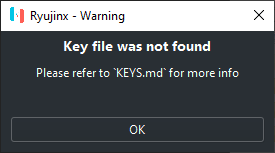
- Click OK on the warning box.
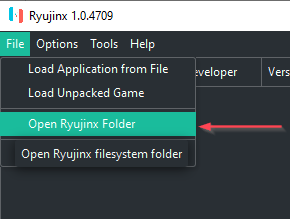
Now that Ryujinx has been launched, the proper folders have been created for you in your %appdata% folder. - Click File at the top left of the Ryujinx window, and then click Open Ryujinx Folder.(打开下图中文件)
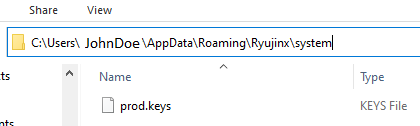
- Navigate down into the system subfolder and paste your prod.keys file here. The file/folder structure should look like this (JohnDoe substituted for your username):(在下图文件system中有key)
- Close and reopen Ryujinx so that the prod.keys file is validated.
You’re done installing keys!
SAK 网站:Releases · dezem/SAK (github.com)
Ryujinx 的网站:Releases · Ryujinx/release-channel-master · GitHub